
Whatnot Mod Commands Explained, and How to Become a Mod
The four moderator commands Whatnot supports in a live show, what each one does with an example, what a mod can do beyond commands, and exactly how a seller makes you a moderator.
Whatnot gives sellers and their moderators four chat commands. They are short, they are typed straight into the chat, and most new mods learn them in their first show. Here is each one with an example, what a mod can do beyond the commands, and how you get made a mod in the first place.
The four Whatnot mod commands
| Command | What it does | Example |
|---|---|---|
| /announce followed by a message | Posts a highlighted message that stands out so nobody misses it | /announce Giveaway is live! Tap Enter Giveaway and stay in the show for the draw |
| /hide followed by a message | Sends a message only the seller and the other mods can see | /hide Buyer in the chat asking about combined shipping |
| /slow followed by a number of seconds | Sets a cooldown between chat messages | /slow 5 |
| /raid followed by a username | Ends this show and sends your viewers to another seller’s live show | /raid @thriftyjackie |
These are the commands Whatnot lists for livestream moderation as of September 2026. Both the seller and any moderator can use them.
What each one is for
/announce is for the things people keep asking about: giveaway rules, shipping cutoffs, “follow for the next drop,” a heads-up that the show ends in ten minutes. Use it a few times a show, not every minute, or it stops standing out.
/hide is the back channel. A seller on camera cannot read every message. A hidden note lets you flag a question they missed, a buyer who needs a reply, or a problem in chat, without viewers seeing the coordination.
/slow is for the moment the chat is flying past faster than anyone can read, usually during a giveaway or a hot item. Five seconds is a common setting; ask the seller how they want it set.
/raid is how a show ends. The seller, or a mod on their behalf, sends the whole audience to another seller’s live show. Getting the username right matters, so agree the raid target before the last item. On a raid train organized on Raid Train Express, the train’s page has the running order, and a seller using Backstage sees a countdown and who to raid into next, so nobody has to remember. See raid trains with Backstage.
What a mod can do beyond the commands
Whatnot gives mods a few tools beyond the commands:
- Remove a user from the show. This removes them from the current livestream only. It is not a platform ban: they can still watch other sellers, and the same seller’s future shows.
- See muted messages. Chat that was muted by the seller’s muted-words list is hidden from viewers but visible to mods, so you can judge whether it needs action.
- Viewer list. Tap the viewer count to see who is watching, plus an Activity tab of raids, new followers, tips, auction wins and purchases.
- Chat filters. Filter the chat to just Questions, Buyers, Mods or Muted messages.
The guidelines are plain about how to use them: lead by example, warn before you remove, remove only when the behavior calls for it or the seller asks, and never remove someone because you disagree with them.
How to become a Whatnot mod
There is no form to fill in with Whatnot. The seller nominates you, for specific shows, in one of two ways:
- Before the show. While scheduling, the seller opens the Moderators section, types your username, and picks you from the list. You are then an approved moderator for that show.
- During the show. The seller taps your username in chat and chooses Allow to Moderate, then confirms.
A seller can take it back the same way, by tapping your username and choosing Remove Moderator.
The realistic path to being asked: be in a seller’s shows regularly, answer questions in chat before anyone asks you to, welcome new people, and be reliable about showing up. Then say you would be happy to help. Sellers notice the people who already act like mods.
Mod better with a free helper
The commands handle the chat mechanics, and Whatnot’s Activity tab shows what just happened. What neither does is keep a running list of who you still need to thank. On a busy show, raids land, tips come in and giveaway winners are drawn while you are typing something else, and one missed thank-you is the thing people remember.
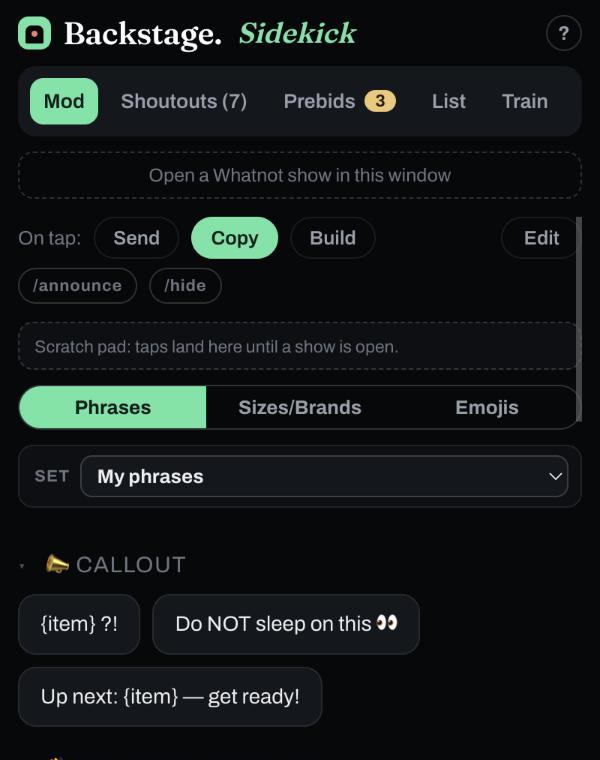
Backstage Sidekick is a free helper that rides next to the show, as a Chrome side panel or an iPhone and iPad app. It keeps a who-to-thank list in arrival order with a waiting clock, a deck of chat phrases you can edit (with a separate phrase set for each seller you mod for), size and brand chips, a prebid radar, and a name list. A tap sends the phrase straight to chat, or switch to Copy and paste it yourself. Turn on /announce or /hide to post it as a highlighted message or one only the seller and mods see. Every phrase is outlined in the mode’s color so you always know what a tap will do: yellow goes to chat, red goes to chat hidden, green copies. Build mode collects several taps into one message. No account, no password, and it never sees your Whatnot login.
Next steps
- New to the seat? Read how to be a good Whatnot moderator.
- Get Sidekick free.
- Ending shows into a train? See how to run a raid train.