
Whatnot Weekly Bundling for Sellers: How It Works, Where It Is Live, and How to Hold a Buyer's Bin All Week
Whatnot's Weekly Bundling groups a buyer's purchases from you across the week into one shipment that closes Sunday night. What the seller has to do, which countries it is live in, the mid-week label trap, and how Backstage holds a bundling buyer's bin across several shows so nothing gets mixed up or shipped early.
Whatnot’s Weekly Bundling is good for the buyer: one shipping charge for a week of purchases. It is also a new job for the seller, because a bundling buyer’s items now have to stay together, unshipped, across several shows, next to items that ship tomorrow. Here is what Whatnot asks of you, read from its help center on September 25, 2026, and how Backstage keeps the bins straight.
What Whatnot’s feature does
Purchases made by the same buyer from the same seller during a week are grouped into one shipment. Bundles close Sunday at midnight, seller’s local time; anything ordered after that counts toward the next week. Once a bundle closes, it must ship within two business days, so by end of day Tuesday.
Both sides opt in. A seller turns it on in Seller Hub on a computer, under Shipments, in the sidebar. A buyer turns it on under Settings, then Payments and Shipping, or from the Wallet inside an opted-in seller’s show. Once a seller enables it, it applies to every live show, marketplace order and Buy It Now order on the account. Marketplace orders bundle with show orders in the same week.
Buyers may still be charged more than once if the package moves up a weight band, if your bundle limit is reached and a second bundle starts, or if you print a label mid-week.
Where it is live
As of September 25, 2026, Whatnot lists Weekly Bundling as live for all sellers in Australia, Austria, Canada, Germany, Japan, the Netherlands and the United Kingdom, and for buyers everywhere except France and Belgium. A US seller cannot enable it yet. If you sell in the US, the rest of this page is what to expect when it arrives, and Whatnot’s regular Smart Bundling of orders within a show still applies.
The seller’s weekly rhythm
After each show: go to Shipments, select the show, and generate labels for buyers who are not bundling. Skip the weekly bundles. Those orders ship within two days as usual. Set the bundled orders aside.
At the end of the week: bundles close Sunday midnight. Go to Shipments, choose “All Shows and Marketplace” and the filter “Only Show Weekly Bundles,” or filter by show and pick weekly bundles or regular orders. Closed bundles show in orange under “Needs Label.” Select the closed bundles and generate labels in bulk, ideally Monday morning before you sell again. Packing slips only appear once the label is generated. Use a computer, not a phone.
The trap: generating a label for a bundling buyer closes their bundle. Do it mid-week by mistake and that bundle has to ship, and the buyer’s next order that week starts a new bundle with a fresh shipping charge.
The problem on the table
Your bins clear when a show ends, because the next show starts clean. A bundling buyer breaks that: their Tuesday items have to stay put, with their bin number, while Thursday’s show adds more to the same buyer, and the bin next to it is packed and gone on Wednesday. Whatnot does not tell a seller’s tools which buyers are bundling, so somebody has to hold that bin on purpose.
Hold this buyer’s bin
Backstage has a feature for exactly this, on both the Chrome extension and the iPad app. It is off by default; turn on Weekly bundled shipping in Settings and it appears.
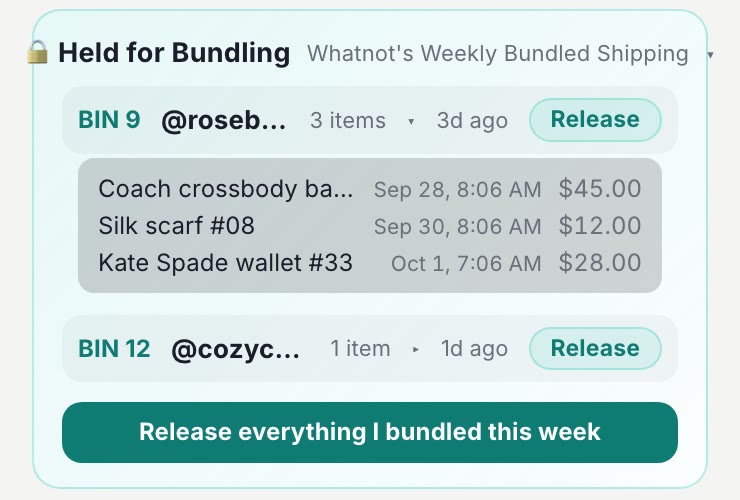
- Hold a buyer’s bin. From the buyer’s card, choose to hold the bin for a bundle. The card changes color so you can see it at a glance.
- The hold survives End Show and Clear. Every other bin resets for the next show; a held bin keeps its number and its contents, and the buyer’s next win, in the next show, lands in the same bin.
- Held bins in one place. A panel lists every buyer currently held on that device, so Monday morning you know exactly which bins are waiting on a label.
- The label says so. If you print bin labels, a held buyer’s label carries a bundle marker, so nobody packs and ships it mid-week by accident.
- Release when the bundle closes. Release one buyer, or release them all at once after you generate the week’s labels.
Two things to know. Holds are manual: Backstage cannot see a buyer’s bundling status from Whatnot, so you hold the bin when you know the buyer is bundling. And holds live on the device you set them on; a hold on the iPad is not known to the Chrome extension, so use the same device all week for a bundling buyer.
Next steps
- How bins work in the first place: the Whatnot bin system.
- The label with the bundle marker: label printing on iPad, Mac and Windows.
- Start with Backstage Lite or the iPad app, free for 7 days.