
The Whatnot Bin System: Sort Buyers as They Win, Pack by Bin When You End
A Whatnot bin system gives each buyer a number on their first win and keeps it for the whole show, so every later win lands in the same bin and the show ends with one bin per order. Backstage assigns the numbers for you as sales land. How the numbering works, what to use for bins, how a packer follows along live, and what the manifest looks like at the end.
Ask any Whatnot seller what the worst hour of the week is and it is the one after the show: a pile of sold items, a list of orders, and the job of matching one to the other. A bin system moves that hour into the show, where it takes no time at all, because each item is sorted the second it sells. Backstage runs the whole system for you: it hands each buyer a number on their first win, keeps it all show, and prints the bin label as the item sells.
The idea in one sentence
Every buyer gets a number on their first win and keeps it for the whole show. Item sells, you look at the number, it goes in that bin. When you end the show, each bin is one buyer’s complete order.
How the numbering works
Whatnot does not number buyers. Backstage does, automatically, as sales land:
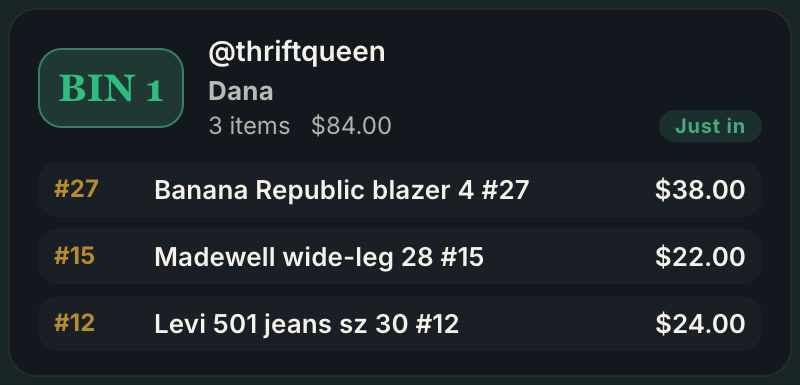
- The first buyer to win gets bin 1. The next new buyer gets bin 2, and so on.
- A returning buyer keeps their number. Their fifth win goes in the same bin as their first.
- A first-time buyer is marked with a star, on the live feed and on the label if you print one, so you can welcome them on air.
- A giveaway win is tagged to its winner like any other item.
- A sale waiting on payment is flagged so that bin does not get packed until the buyer pays.
The numbers hold for the whole show and reset when you clear the show for the next one. You never assign, remember or reuse a number by hand.
What to use for bins
The container does not matter; the number does. Sellers use:
- Numbered cards on a rack for clothing: clip the card to the hanger, hang it in order.
- Numbered poly bags for small items and cards: drop the item in, seal it, done.
- A shelf of tubs or boxes for anything bulky or breakable.
Backstage’s manifest and bin labels carry the same numbers, so whichever you choose lines up at the end.
Let a packer work while you sell
If someone helps you pack, they do not need to watch your stream or ask you who bought what. Backstage has a live board you share by link. Your packer opens it on a phone, tablet or laptop with nothing to install and no login:
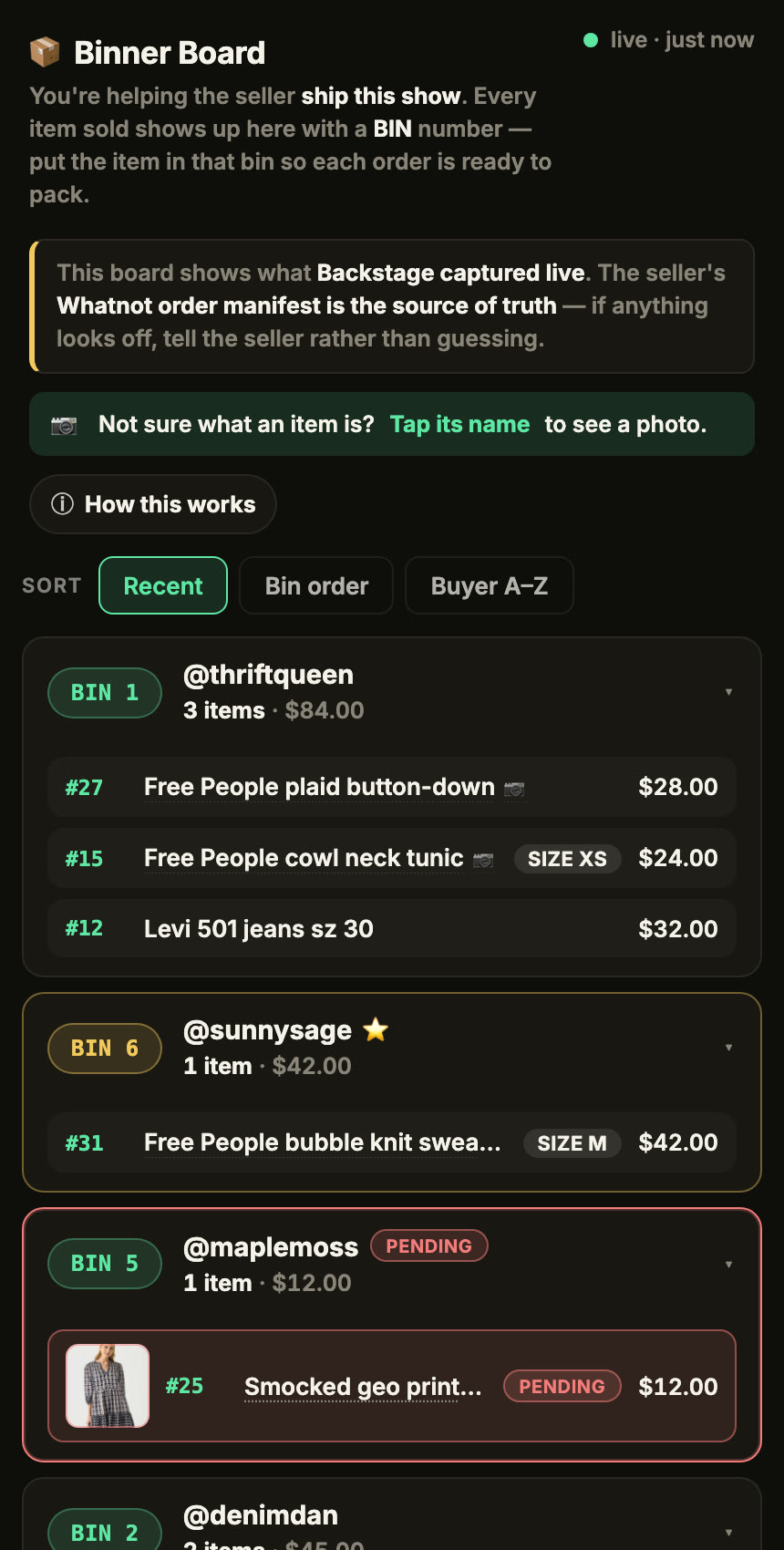
- Each buyer’s wins stack in their bin live, with the item, size and price.
- Pending items show a photo, so the right one gets pulled.
- First-time buyers and unpaid sales are flagged, so nothing ships early.
- Sort by most recent during the show, by bin order to walk the shelf, or by buyer name to match Seller Hub.
Each show has its own board, reachable only by its link.
Labels, if you want them
You can run a bin system with a marker. Backstage Lite also hands you bin-label PDFs at the end of the show, in five formats from plain letter paper to Avery sheets to thermal sizes, so you can print a set on any printer and label by hand.
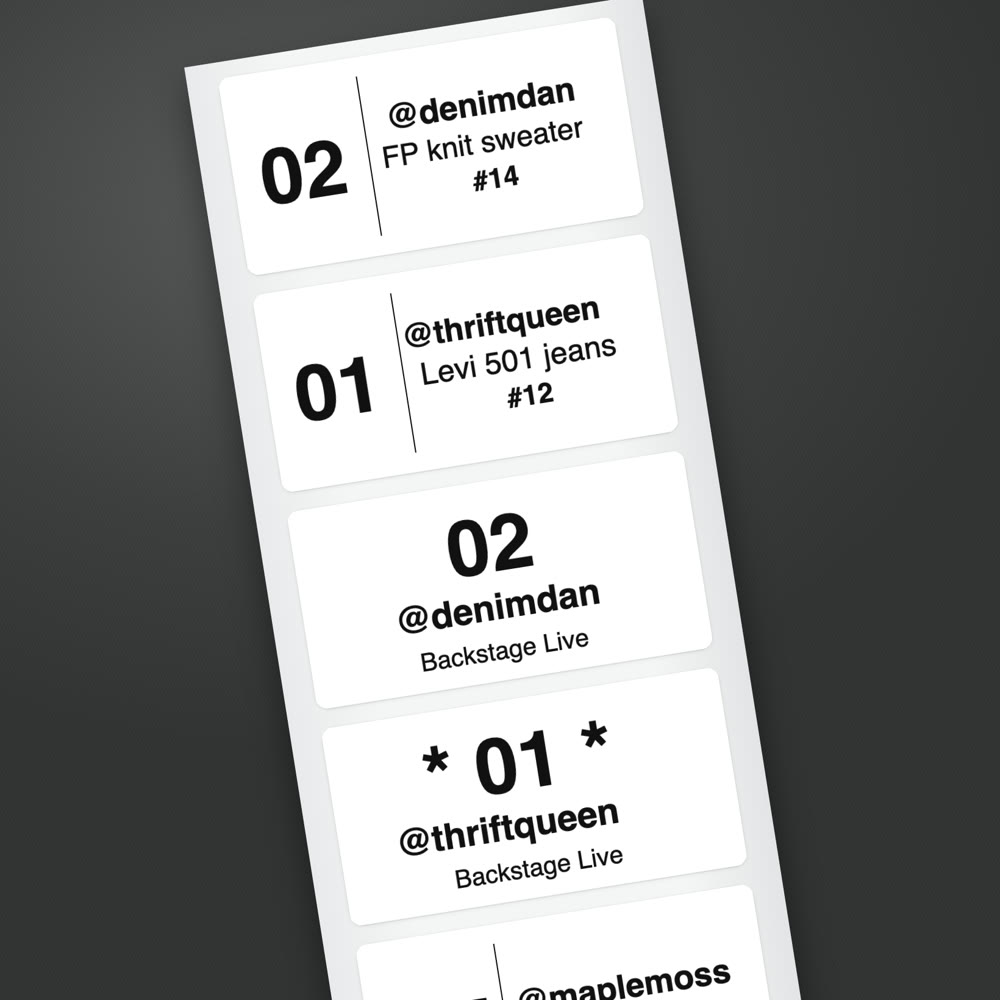
If you want the label to print itself the moment an item sells, with the bin number big enough to read across the room and the buyer’s handle under it, that is label printing on the Plus plan, on Mac, Windows, or natively on iPad.
When you end the show
One click ends the show and produces the manifest: every buyer, every bin, every item, with totals, grouped by bin and sorted in pull order. Then head to Seller Hub for your shipping labels. Whatnot’s own tip is to sort shipments alphabetically by buyer there; the board and the manifest can both be sorted by buyer name so the two lists line up buyer by buyer. If Whatnot splits a buyer into two shipments, you will see both under their name.
No video receipts. No cross-referencing handles to orders to bins. The sorting happened while you were selling.
Next steps
- Every job in one place: Whatnot seller tools, from sales capture and bins to labels and packing.
- What to buy, by job: the Whatnot seller toolkit, from label printers and bins to mailers and lights.
- See what is recorded on every sale: the Whatnot sales tracker.
- End the show packed: how to ship Whatnot orders faster.
- A buyer whose card declined: what to do with a pending payment.
- A buyer who bundles all week: Weekly Bundling and holding their bin.
- Start with Backstage Lite, free for 7 days, or run it on the iPad app.