
Whatnot Shipping Adjustments Explained: The 5 Free Ones, What Always Costs Money, and the New Carrier Adjustment Charges
A shipping adjustment is any change you make to a shipment after the sale: weight, size, service, bundling. US sellers get five free ones a week, resetting Sunday at 7 pm Eastern; some changes are always free, some always cost money, and shipping is never refunded downward. Separately, since spring 2026 Whatnot has started billing US sellers for USPS carrier adjustments when the package was heavier or bigger than the label. Here's how both work, from Whatnot's help center as of September 29, 2026, and the one habit that stops you paying for either.
A shipping adjustment is any change to a shipment after the sale, and Whatnot gives US sellers five free ones a week. Some changes never count, some always cost money, and shipping is never refunded downward. A carrier adjustment is a different animal: USPS finding out after delivery that the package didn’t match the label, and since spring 2026 Whatnot has started passing some of those charges to US sellers. People mix the two up constantly, and the seller groups are full of surprise negative balances because of it. So let’s take them one at a time, from Whatnot’s help center as read on September 29, 2026.
Shipping adjustments: changes you make before the package ships
You adjust a shipment on whatnot.com, from the Shipments page in Seller Hub. You can’t do it in the app. Reasons you might:
- the weight or dimensions are wrong because the listing’s shipping profile was wrong,
- you want to bundle several of a buyer’s orders into one box, or split one,
- you want a different shipping service (US only), or
- you want insurance or signature confirmation (US only).
When you can still do it. Before a label exists, anything goes, including bundling. After the label exists but before drop-off, you can change weight, dimensions or service; Whatnot voids the old label and makes a new one, and you have to use the newest one. You can split a bundle until the package is in transit. Once it’s in transit, that’s it.
What it costs. Shipping was charged to the buyer at checkout. If the new label costs more, one of three things happens: it’s covered by an always-free rule, it uses one of your five, or you pay the difference out of your Whatnot balance. Seller Hub tells you which before you confirm. If the new label costs less, nothing happens: the buyer’s charge stays put and there’s no refund. As one seller in a thread put it, Whatnot never adjusts shipping lower.
The five free adjustments
US sellers get five a week, resetting Sunday at 7 pm Eastern. Sellers outside the US also get five, resetting Monday at 12:01 am UTC. Your remaining count is on the Shipments page: open the sidebar before choosing a shipment and look for Label adjustment allowance.
| Examples | |
|---|---|
| Always free (don’t use an adjustment) | A weight change that stays in the same USPS pricing tier. A weight change on a Flat Rate box when Flat Rate was on before the sale. Bundling, when the combined label is cheaper than the separate ones. |
| Uses one of your five | Weight moving up a tier: under 1 lb to 1 to 5 lb, 1 to 5 lb to over 5 lb, or up to 5 lb more on a heavy package. Unbundling when the separate labels cost up to $5 more than the original. Dimensions growing past one cubic foot or past 22 inches on any side. |
| Always charged (even with free ones left) | Insurance or signature confirmation. A weight increase over 5 lb in one change. Under 1 lb straight to over 5 lb. Dimensions past two cubic feet. Unbundling when the separate labels cost more than $5 above the original; you pay the full difference. |
The tiers that matter are Whatnot’s Ground Advantage bands: up to 4 oz, 4 to 8 oz, 8 to 12 oz, 12 to 16 oz, then 1 to 5 lb as one flat band, then weight-and-zone pricing above 5 lb. A 6 oz package corrected to 7 oz is free. A 14 oz package corrected to 1 lb 2 oz uses one of your five.
Unbundling is where the big charges hide
Smart Bundling packs a buyer’s wins into as few shipments as the math allows. If you split one of those bundles yourself, each new box needs its own label, and the gap between one label and several can be a lot more than $5, which means you pay all of it. Sellers in the threads talk about unbundling one order and getting hit for over $40. Whatnot’s own advice: unbundle only for things that genuinely can’t travel together, and set that rule in a custom shipping profile before the show, where it’s free, not after the sale, where it isn’t.
Carrier adjustments: USPS finds out afterward
A carrier adjustment happens when USPS weighs or measures the package somewhere in its network and it doesn’t match the label. USPS charges the difference and sometimes a fee on top. For years Whatnot ate these, which is why most sellers never knew they existed. In spring 2026 Whatnot began charging US sellers for some carrier adjustments on Whatnot-generated USPS labels. The first reaction in the seller threads was a prediction of a wave of negative-balance posts, and that’s about what happened.
Where to see them. Seller Hub on whatnot.com now has a Carrier Adjustments dashboard. At a Glance shows your adjustment rate over 30 days against other sellers in your category, plus the total and average cost. Recent Charges lists each one, and the detail page puts the label’s weight and size next to what USPS measured, along with the orders and shipping profiles in that shipment and the cost breakdown. Whatnot also sends a weekly digest email. Adjustments show up weeks after the package ships, so the dashboard lags on purpose.
What is and isn’t charged. Whatnot says it still covers most carrier adjustments. When one is passed to you, it shows in your ledger. Dimensional adjustments, where USPS prices by box size instead of weight, aren’t being charged to sellers until later in 2026. Bring Your Own Label sellers are outside all of this; their carrier bills them directly.
Appealing. You have 45 days from the charge, one appeal per shipment. The appeal goes to USPS, so explain the weight or size in terms USPS can check, not Whatnot terms. USPS can take up to 90 days. If it’s approved, the amount is refunded to your ledger. If the appeal button says Ineligible, check the dashboard first: Whatnot may have covered that one, which means you were never charged.
Postage due is the same problem from the buyer’s side. When a package is short-paid, USPS sometimes collects the difference from the buyer at the door. Whatnot’s rule is that the buyer should contact support and be reimbursed, and the seller is the one who needs to fix the weight. If you get a postage-due notice yourself, usually on a returned package, contact support too.
The one habit that prevents both
Every adjustment, free or paid, and every carrier charge comes from the same place: the weight and size on the listing didn’t match the box that went out the door. Whatnot’s advice and the experienced sellers’ advice are the same three steps.
- Weigh the item with its packaging before you list. The shipping profile is the packed weight: item, mailer or box, padding. A 12 oz item in 8 oz of box is a 20 oz listing, not a 12 oz one.
- Give different weights their own listings. Run a whole show from one “mystery item” listing at 1 lb and every 6 oz and every 2 lb item ships on a 1 lb label. Make small, medium and large versions with honest weights and pick the matching one live. That’s how the sellers with low adjustment rates do it.
- Check the shipment before you print the label. In Seller Hub, compare the shipment’s weight and dimensions with the box on your table. Fixing it there is often free and never worse than one of your five. Letting USPS find it is never free.
Whatnot also says outright that adjustments are for occasional corrections, and that repeatedly inaccurate shipments can lead to account action.
Where Backstage fits
Backstage doesn’t touch your shipping settings or labels; those live in Seller Hub. What it does is make those three steps something you’ll actually do on a Tuesday night, instead of something you mean to do.
- Pick the profile at your desk, not mid-auction. Prep lets you list the whole show ahead of time with the Whatnot shipping profile chosen per item, in Whatnot’s own weight bands, and push it all in one CSV. The weight decision happens with a scale in your hand, not while the timer’s running.
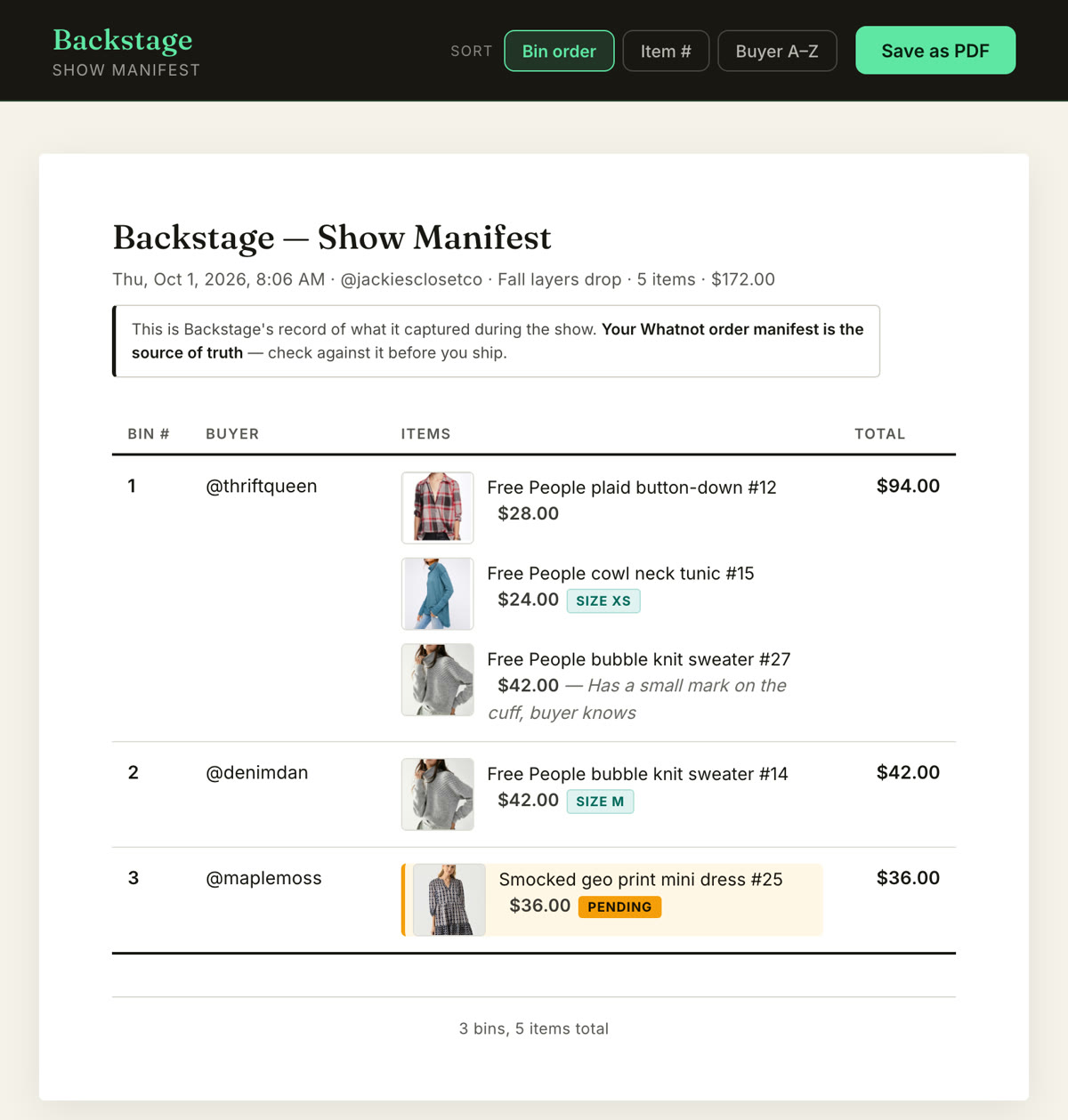
- Know what’s in each box before you print. When you end the show, Backstage hands you a manifest of every buyer and everything they won, grouped by bin. Hold the shipment in Seller Hub against that list and the box in front of you, and fix the weight before the label, where it’s free.
- See what shipping did to your night. Whatnot’s processing fee is charged on the whole order including shipping, and any shipping difference you cover comes out of your balance. Backstage shows what each item actually earned after fees right on the manifest, so a show that “made $400” and a show that cleared $269 stop being the same number to you. The fee calculator does the math on any sale.
Next steps
- How the profile gets set right in the first place: Whatnot shipping profiles explained.
- The whole picture, rates included: Whatnot shipping for sellers, explained.
- Get the labels out the same night: how to ship Whatnot orders faster.