
Whatnot Shipping Profiles Explained: Packed Weight, Custom Profiles, Max Bundle Size and Incremental Weights
A Whatnot shipping profile is the packed weight of one listing: item plus box plus padding. It decides what the buyer pays at checkout, which USPS service is used, how items bundle, and whether you get hit with adjustments later. Here's how suggested and custom profiles work, when to set a max bundle size, what incremental weight means, and how clothing sellers and card sellers actually set theirs, from Whatnot's help center and seller threads as of September 29, 2026.
A Whatnot shipping profile is the packed weight of one listing: the item, the box or mailer, and the padding. It’s the number almost everything else in shipping is worked out from. It decides what the buyer pays at checkout, which USPS service the label uses, how a buyer’s wins bundle together, and whether you get an adjustment or a carrier charge afterward. Get it right and shipping mostly takes care of itself. Get it wrong and every fix costs somebody money. Here’s how profiles work, from Whatnot’s help center and the seller threads as of September 29, 2026.
What the profile controls
Whatnot uses the shipping profile to:
- work out what the buyer pays for shipping at checkout,
- decide which services are available for the shipment,
- generate the label after the sale, and
- bundle the same buyer’s wins into as few shipments as the math allows.
Two ways it goes wrong, straight from Whatnot’s page. Too low, and the label is underpaid: you adjust it after the sale, pay a carrier adjustment, or the package gets refused. Too high, and buyers pay more shipping than the item needs, which shows up as fewer bids.
Packed weight means everything in the box. Whatnot’s own example: a 12 oz item in 8 oz of packaging is a 20 oz listing, which lands in the 1 to 2 lb profile. Weigh one packed item on a kitchen scale and use that.
Suggested profiles versus custom profiles
When you list, Whatnot suggests a profile based on the category and weight. Use the suggested one when the item is a normal size and weight, can share a box with other things, and you don’t need to limit bundling. That’s most listings.
Make a custom profile when the item is oversized, heavy or fragile, when you want to cap how many can ship together, or when you want to set an incremental weight for extras. Custom profiles live in the app under Shipping Settings, or on whatnot.com under Shipments, then Shipping Profiles. A custom profile has four parts:
| Field | What it does | Example |
|---|---|---|
| Name | Whatever you’ll recognize in a hurry | ”Heavy gowns”, “4-inch Funko” |
| Weight | Packed weight of one item, with the unit | 20 oz |
| Max items per package (optional) | Caps how many of this item ship together; you can also enter box dimensions or pick a Flat Rate box | 1 for a fragile vase |
| Fixed weight for additional items (optional) | The incremental weight: what each extra item adds when the packaging is already counted | first item 20 oz, each extra 15 oz |
When you edit a custom profile you can push the change to every active listing that uses it. Sold listings aren’t touched.
How profiles drive bundling
Whatnot’s Smart Bundling groups a buyer’s wins into as few shipments as it can, and splits them when splitting is cheaper. For most sellers there’s nothing to do. The profile changes that behavior in exactly one case: a custom profile with a max bundle size. Then items only bundle with items on the exact same profile, and bundling stops at the limit. Set a max of 3 and a buyer who wins 4 gets two packages, each with its own shipping charge.
That’s why Whatnot’s advice is to leave max bundle size off for small and light items. Save it for golf clubs, framed art, boxed collectibles, anything that can’t share a box. And one thing sellers learn the hard way: a listing with a custom profile or a max bundle size isn’t eligible for First-Class Mail Letter, the cheap plain-envelope option for cards.
Incremental weights are the other lever. The first item in a bundle counts at its full packed weight; each extra item from the same category adds only the increment. Whatnot applies these on its own:
| Category | Suggested profile | Each extra item adds |
|---|---|---|
| Trading Card Games | 0 to 1 oz | 0.5 oz |
| Sports Cards | 0 to 1 oz | 0.5 oz |
| LEGO | 0 to 1 oz | 0.5 oz |
| Comic Books | 4 to 7 oz | 2.5 oz |
| Diecast Cars | 4 to 7 oz | 3 oz |
Three comics on the 4 to 7 oz profile ship at 7 + 2.5 + 2.5 = 12 oz. For any other category you set your own increment on a custom profile.
How sellers actually set theirs
Clothing. The threads settle on 12 to 15 oz for an ordinary shirt or pair of jeans in a poly mailer, with heavier profiles for jackets, boots and denim lots. Since July 31, 2026, Ground Advantage charges one flat price for anything from 1 to 5 lb, so a buyer who wins three pieces pays the same shipping once the bundle crosses a pound. Sellers who run a whole show from one 1 lb listing save time listing and pay for it later: light items overcharge the buyer, heavy items underpay the label. Two or three custom profiles named by garment type is the usual fix. Sellers who bundle heavy random pulls use something like 12 oz plus a 4 oz increment.
Cards. Suggested 0 to 1 oz profile, no custom profile, no max bundle size, and First-Class Mail Letter turned on before the show if you sell singles under $20. The automatic half-ounce increment means ten singles don’t cost ten times the shipping. Slabs and sealed product get their own heavier profile; a graded card in a top loader and bubble mailer is not 1 oz.
Heavy and bulky. Once a shipment passes 5 lb, Ground Advantage prices by weight and zone and the flat band is gone. Whatnot won’t create a second label on its own when a bundle crosses 5 lb; it prices the heavier box. If you want boxes capped, a custom profile with box dimensions and a max bundle size is the tool.
Mixed random pulls. Whatnot’s recommendation for multi-quantity listings is small, medium and large versions with honest weights, and you pick the right one live. It keeps weights accurate without slowing the show, and it’s the single biggest cut to the adjustment rate in the Carrier Adjustments dashboard.
What a wrong profile costs
A profile that’s too low gets fixed in one of three places, in rising order of cost: on the listing before the show (free), on the shipment before the label (free within the same tier, one of your five free weekly adjustments if it moves up a tier, charged above that), or by USPS after delivery (a carrier adjustment, now billed to US sellers in some cases). A profile that’s too high is never refunded; the buyer just paid more. The shipping adjustments guide has the full free-and-charged lists.
Where Backstage fits
Backstage doesn’t set or change shipping profiles; those live in Whatnot. What it changes is when you decide them, and how much of a chore it is.
- Decide at the desk, with a scale. Prep lets you list a whole show ahead of time with the Whatnot shipping profile picked per item, in Whatnot’s own weight bands, and pushes the batch in one CSV. You choose the weight while you’re holding the item and the box, not while an auction is running.
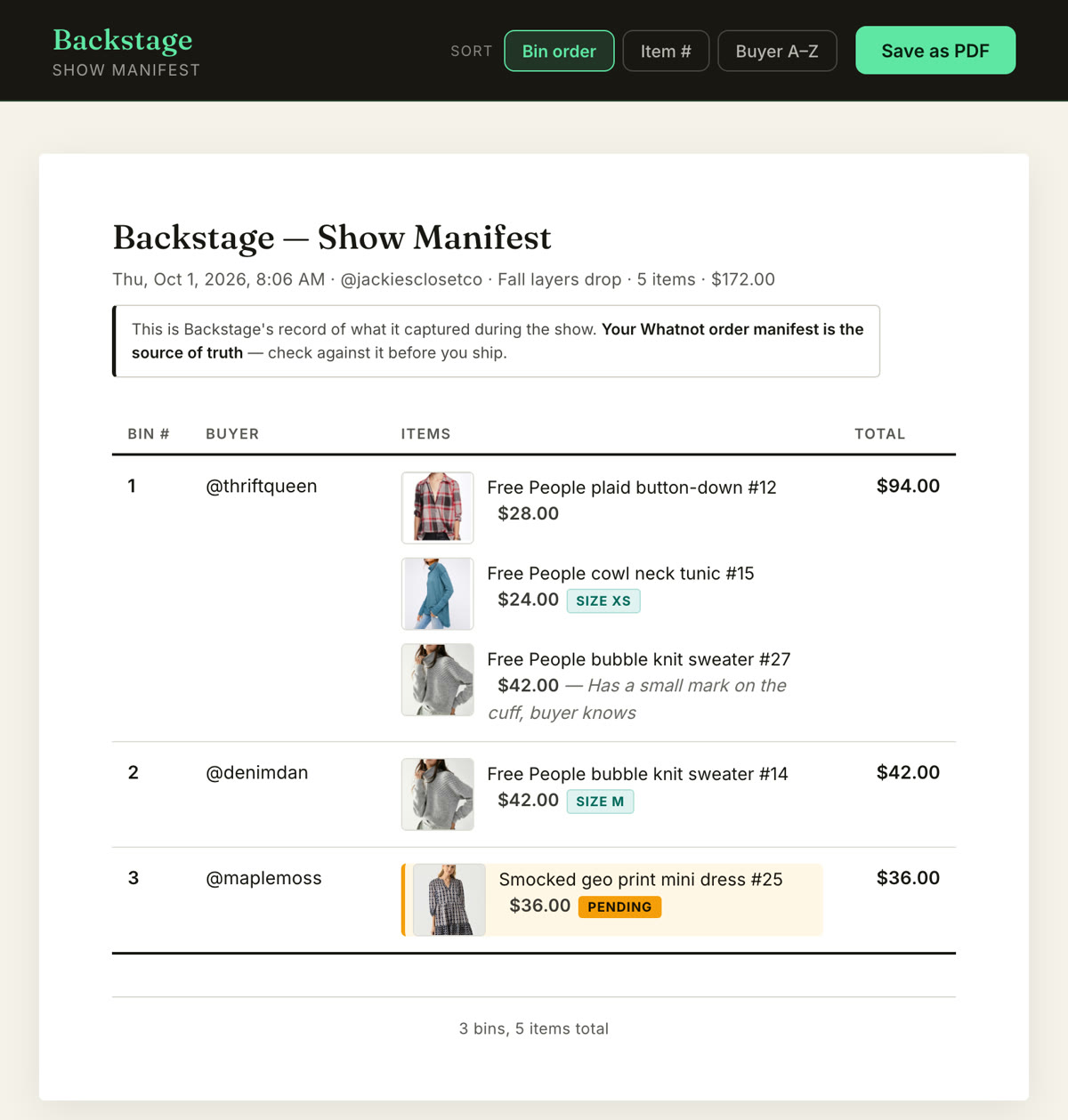
- Check before you print. The manifest Backstage builds at End Show lists every buyer’s items by bin, so the weight check against Seller Hub’s shipment is a glance, not a dig through the pile.
- And the pile is already sorted. Because every sale went into its buyer’s bin as it happened, the box you’re weighing is the box that ships. Nothing to reconstruct first.
Next steps
- What happens when the profile was wrong: Whatnot shipping adjustments explained.
- The full rate table and who pays what: Whatnot shipping for sellers, explained.
- List with the profile set before the show: the Whatnot bulk listing tool.