
Whatnot Label Printer App for iPad: Print Labels, Sort Bins and Track Sales With No Computer
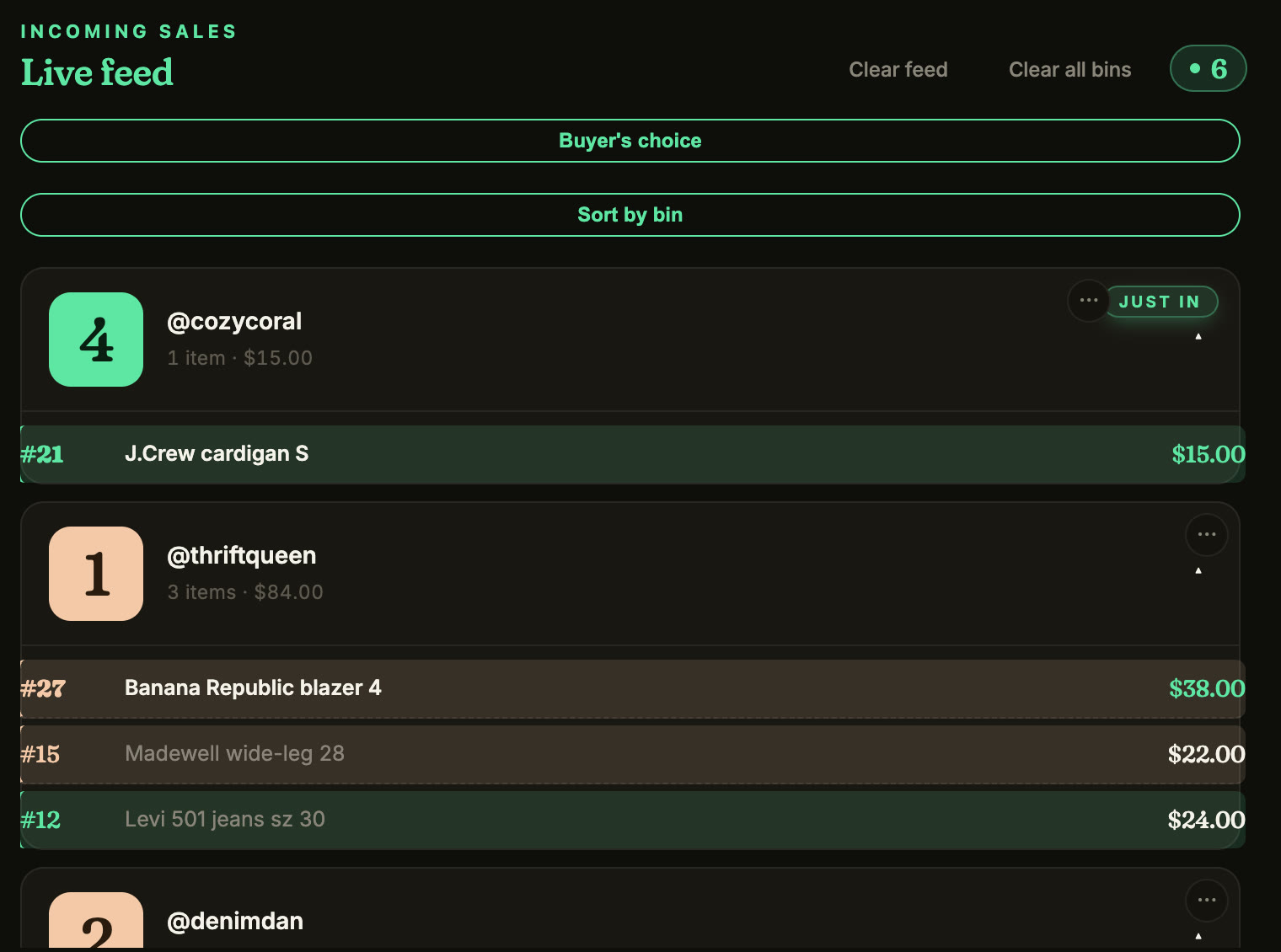
Run your whole Whatnot show from an iPad. Backstage Live for Whatnot is a native iPad and iPhone app that records every sale by buyer, sorts each buyer into a numbered bin, and prints a bin label over Bluetooth the second an item sells. No laptop, no desktop, no print server.
You can run your whole Whatnot show from an iPad with Backstage Live for Whatnot. The phone on the stand is the camera. The iPad does everything else: it records every sale by buyer, sorts each buyer into a numbered bin, and prints a bin label the second an item sells. No laptop on the table, no desktop in the back room, no print server to keep awake.
That’s what Backstage Live for Whatnot is: a native iPad and iPhone app built for Whatnot sellers.
What the iPad does during your show
- Records every sale as it happens: the buyer, the item, the price and the time, for auctions, Buy It Now and flash sales. Each sale gets a screenshot from your stream, so you know exactly what went out.
- Sorts buyers into bins. Each buyer gets a bin number on their first win and keeps it all show. Every later win lands in the same bin, and repeat buyers stay on one card.
- Prints a bin label the second an item sells, over Bluetooth. Choose Bin only for one label when a buyer’s bin opens, or Every sale for that plus a label on each item.
- Flags the moments you’d miss: raids, giveaway winners, tips, first-time buyers and pending payments, while those people are still in the chat. Giveaway wins never use up a bin number.
- Lets a packer follow along on a live board you share by link, on any device, with nothing to install.
Label printing on the iPad
Most Whatnot label and sorting tools need a computer running beside your show: a desktop program, or a browser tab on a laptop that can’t go to sleep. Backstage prints straight from the iPad.
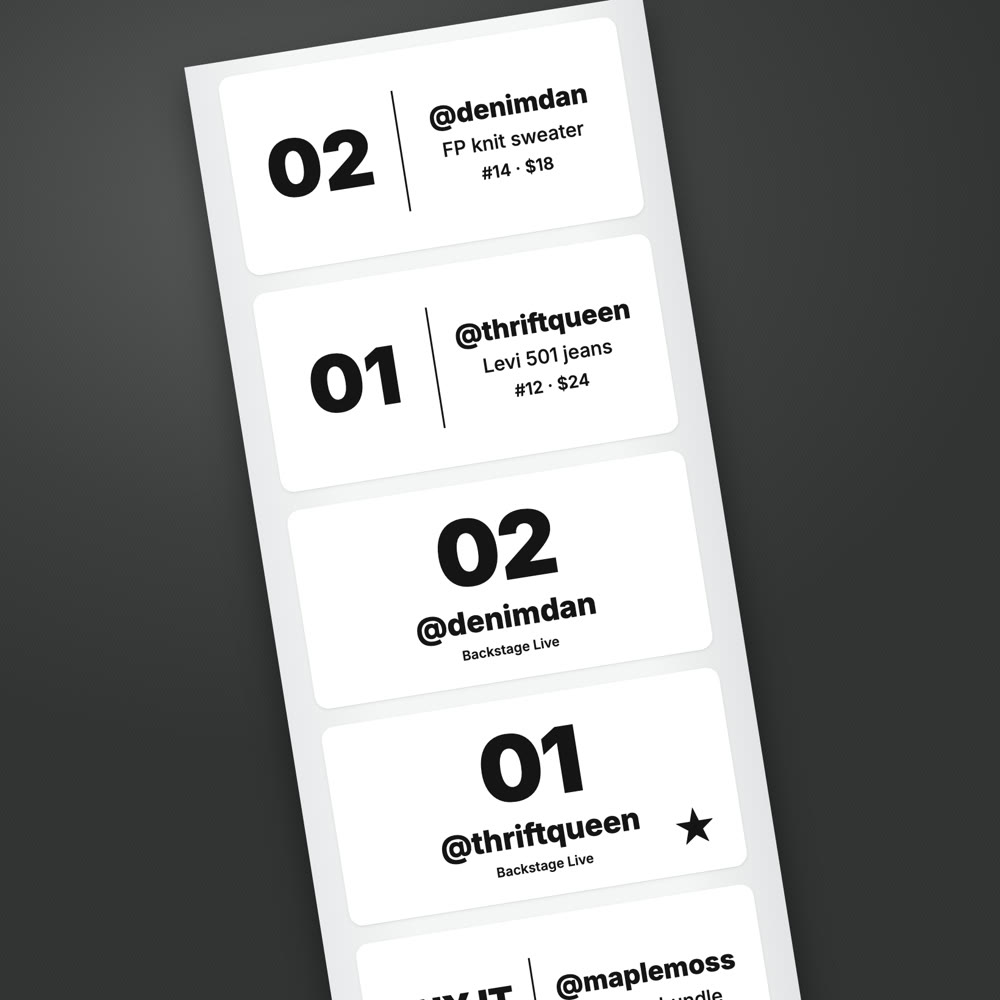
- Printers: Bluetooth thermal label printers. Backstage has printed from the iPad on the Jadens JD-268BT, Nelko PL70E and Rongta RP425.
- Pairing: pair the printer inside Backstage, not in the iPad’s Bluetooth settings. For Jadens, Nelko and similar printers, set the printer type to TSPL / Generic Label Printer.
- Label sizes: the classic 2 by 1 bin sticker, 3 by 2 and 4 by 6, plus 2 by 2, 3 by 3, 4 by 2, 4 by 3 and 4 by 4.
- What prints: a big, readable bin number and the buyer’s @username, with a star for first-time buyers.
- No printer yet? Everything else still works, and your bin labels are available as a PDF to print later.
Printer and label links on this page are affiliate links: as an Amazon Associate, Backstage earns from qualifying purchases.
These are bin labels, for sorting while you sell. Your shipping labels still come from the Shipments page in Whatnot’s Seller Hub, where you can generate them any time after a sale.
When you end the show
Tap End Show and Save Manifest. You get a packing manifest sorted by bin, in pull order, with photos of the items, so packing is one pass down the row of bins. The show also lands in your recap with your real net after Whatnot’s fees.
Before the show: list on the iPad too
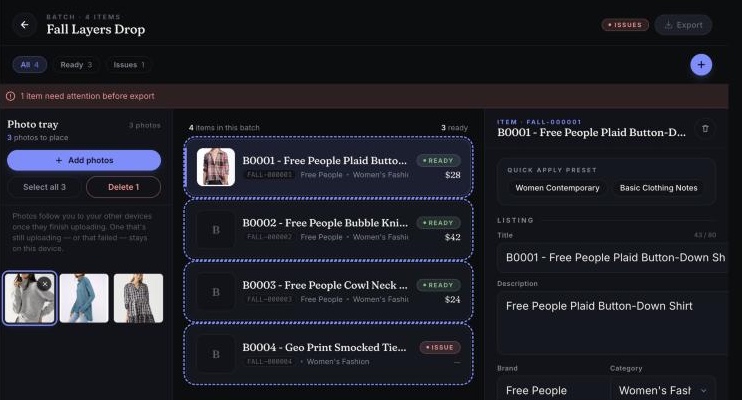
Backstage Prep is in the same app. Build a batch of listings with Whatnot’s categories, conditions and shipping profiles as pick lists, apply a saved template to the whole batch, and export a CSV in Whatnot’s bulk-upload format. The upload itself happens in Seller Hub on whatnot.com.
The setup
- Your phone on a stand, as the camera. Start the show on it.
- An iPad on iPadOS 16 or newer, or an iPhone, running Backstage. Open the same live show inside the app.
- Optional: a Bluetooth thermal label printer and labels.
The step-by-step iPad show guide walks through going live, the pre-show check and ending the show.
iPad app or computer tools
| Tools that run on a computer | Backstage on iPad | |
|---|---|---|
| Where it runs | A laptop or desktop kept on beside your show | The iPad or iPhone you already have |
| Computer needed during the show | Yes | No |
| Every sale recorded by buyer | Varies | Yes |
| Buyers sorted into numbered bins | Varies | Yes, automatically |
| Bin label prints as the item sells | Yes | Yes, over Bluetooth |
| Packing manifest sorted by bin | Varies | Yes, with item photos |
| Listing prep before the show | Rarely | Yes, Prep in the same app |
Prefer a computer? Backstage Lite does the same live capture and label printing in Chrome on Mac or Windows, with the same login. See how label printing works on iPad, Mac and Windows.
Next steps
- Get the app: Backstage Live for Whatnot, included in Plus and Pro with a 7-day free trial.
- Set up your first show: run a Whatnot show from an iPad.
- How bins work: the Whatnot bin system.
- What to buy, by job: the Whatnot seller toolkit, from label printers and bins to mailers and lights.