
The Best App for Whatnot Sellers Who Run Live Shows, by Job
The best app for a Whatnot seller who runs live shows is two apps: Whatnot's own app for the show itself, and one tool for the job Whatnot leaves to you, which is keeping track of who bought what, sorting each buyer into a bin, labeling items as they sell and packing at the end. Backstage does that job, in Chrome beside your show or as a native iPad app on the Plus and Pro plans. Which apps Whatnot sellers use for each job, which ones you actually need, and how Backstage runs the live show.
The best app for a Whatnot seller who runs live shows is really two apps. Whatnot’s own app runs the show. And one tool handles the job Whatnot leaves to you: keeping track of who bought what while you sell, sorting each buyer into a bin, labeling items as they sell and packing at the end. That’s the job Backstage is built for.
Here are the apps Whatnot sellers use for each job, which ones you actually need, and how Backstage runs the live show. Whatnot’s features are from its help center as of October 2026.
The apps Whatnot sellers use, by job
| The job | What sellers use |
|---|---|
| Running the stream | The Whatnot app on a phone. OBS on a computer if you want real cameras, overlays or scenes; Whatnot supports it through Show Tools on whatnot.com. |
| Keeping track of who bought what, live | Whatnot’s Activity tab shows who won. A live-show tool like Backstage records every sale by buyer, gives each buyer a bin, prints the label and builds the packing list. |
| Getting inventory listed | Whatnot’s listings and CSV bulk import, or a listing tool like Backstage Prep. |
| Shipping | Whatnot’s Shipments page for shipping labels and packing slips. |
| Your numbers | Seller Analytics, Seller Statements and the Ledger in Seller Hub. For profit after what your stock cost, Backstage joins each live sale to what you paid for it: see the Whatnot profit tracker. |
| Moderating chat | Whatnot’s moderator tools, plus a chat helper like Backstage Sidekick, which is free. |
The second row is the one that decides whether your night ends sorted or in a pile.
The job Whatnot leaves to you
Whatnot tells you who won. During a show, the Activity tab lists each win and purchase, and show stats give you estimated sales and order count. After the show, every sale is an order in Seller Hub.
What none of that does is sort your table while you sell. In a fast show, with auctions back to back, the items pile up faster than anyone can write names down, and that’s where the wrong item ends up in the wrong box. Whatnot’s own Sorting Labels, which print a label as items sell, are in beta for selected pilot sellers.
A live-show tool does the writing for you, so the pile is already sorted by buyer when the show ends. More in how Whatnot sellers keep track of who bought what.
How Backstage runs the live show
Backstage runs in a side panel next to your Whatnot tab in Chrome, on Mac or Windows. On the Plus and Pro plans, the same login also runs Backstage Live for Whatnot, a native iPad and iPhone app, so you can run the show with no computer at all.
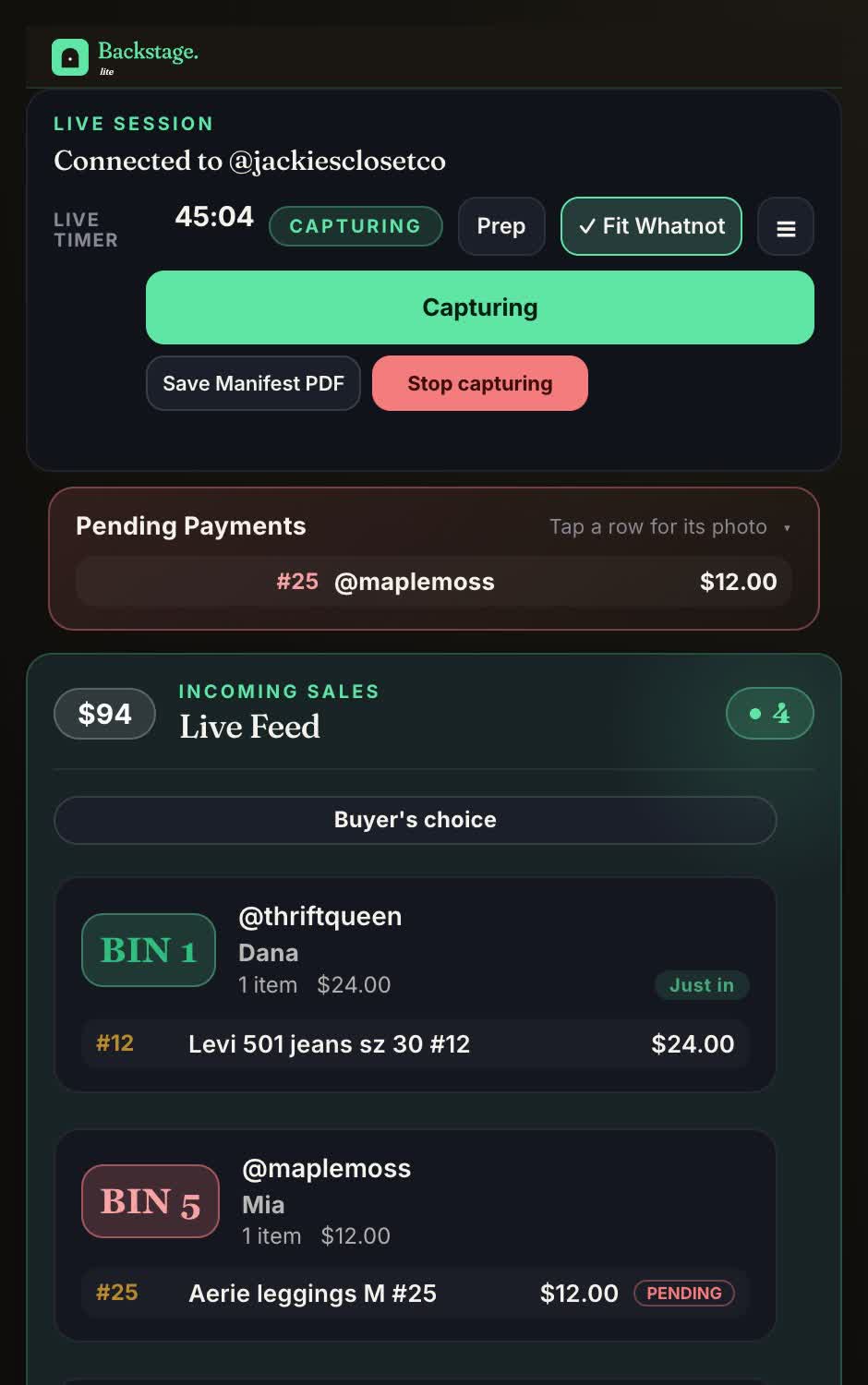
While you sell
- Every sale, by name, the second it happens. The buyer’s name and @username, the item, the price and the time, for auctions, Buy It Now and flash sales.
- A bin for every buyer, assigned on their first win and kept all show, with one card per buyer showing everything they’ve won.
- Labels as items sell, on the Plus and Pro plans: a bin label with the bin number and @username, a star for a first-time buyer, and item labels if you want one per sale. In Chrome it prints to the label printer you already have, through a small helper app; on the iPad, over Bluetooth or Wi-Fi.
- The things that are easy to miss live: raids, giveaway winners, tips and first-time buyers, flagged while they’re still in the chat.
- Pending payments marked, kept in their bin and out of your totals until they clear.
- A live board for your packer, shared by link, with each buyer’s bin filling in as items sell.
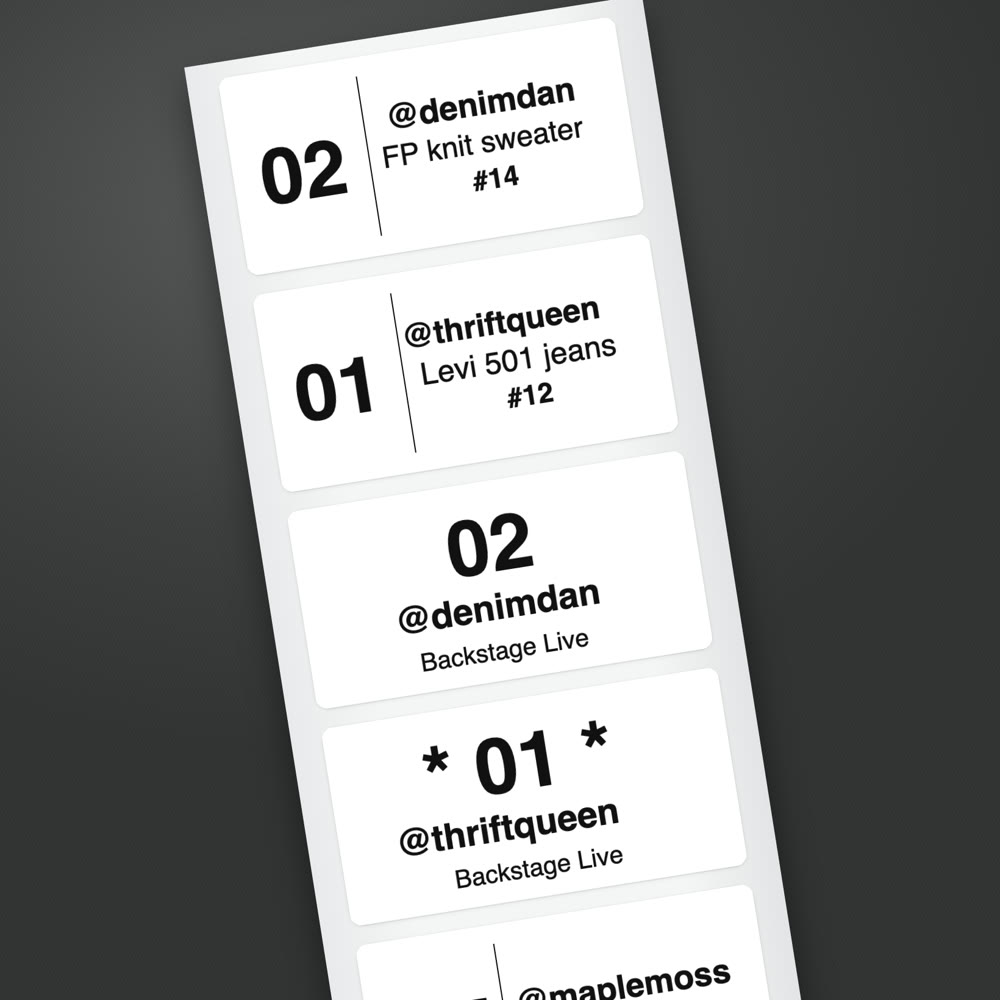
When you end the show
- A packing manifest with every buyer, bin and item, grouped by bin. Sort it by buyer name and it lines up with the Shipments page in Seller Hub.
- A show recap with your net after Whatnot’s fees.
- Show Wrapped, a scorecard of the night with your goal and any new records, plus a picture to share that shows counts only, never dollars or buyer names.
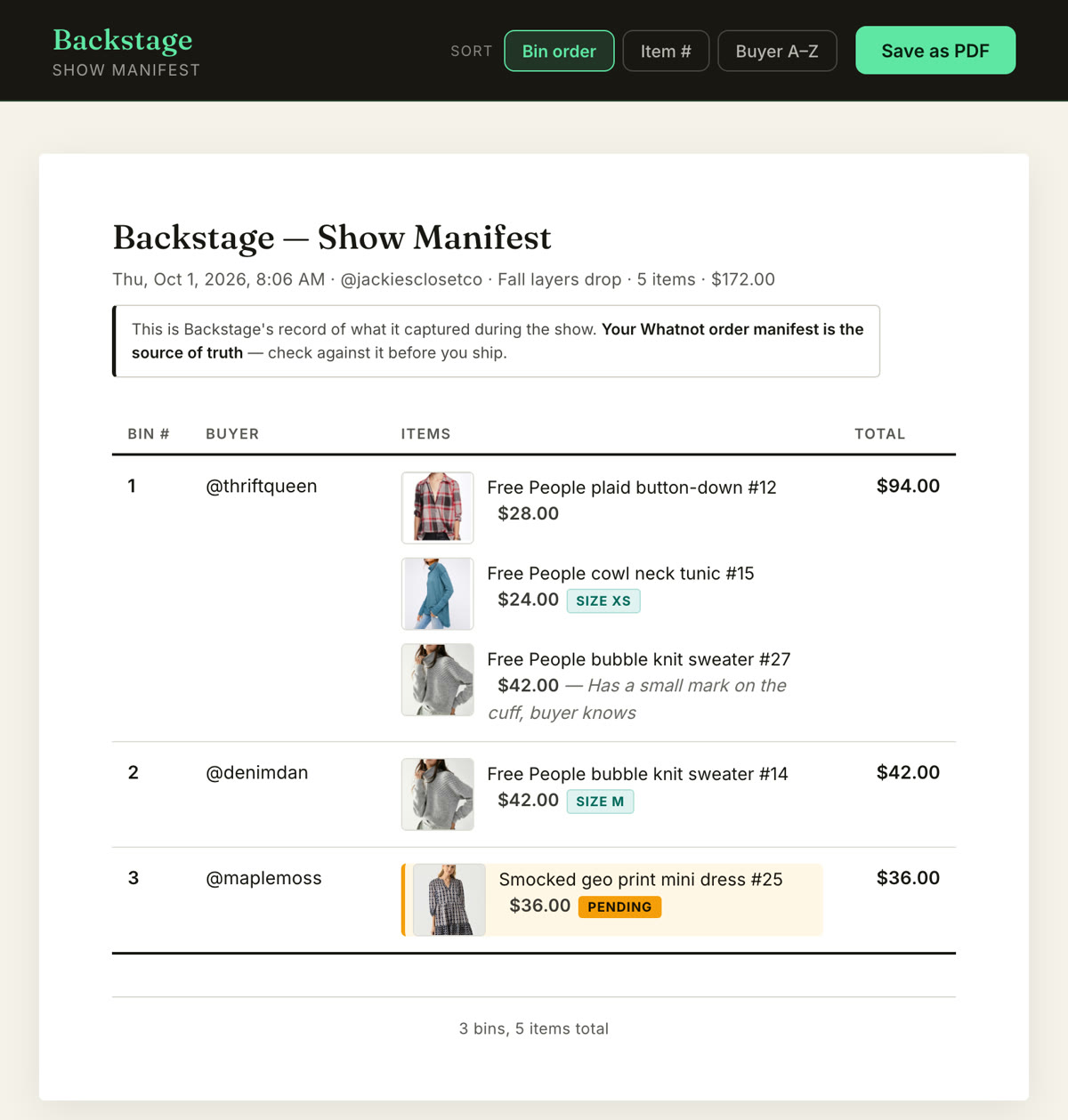
What it doesn’t do: Backstage doesn’t stream your show, make shipping labels or touch your Whatnot account. Whatnot does those. Backstage handles who bought what, which bin it’s in, and what to pull.
Which apps you actually need
| Where you are | What to run |
|---|---|
| Your first shows | The Whatnot app on your phone, numbered bins and a marker. |
| Selling every week | Add Backstage so every sale is recorded by buyer and sorted into bins, and a label printer so labels print as items sell. |
| Big shows or a team | Add a packer on the shared live board, bulk listing with Prep or a CSV, a mod with Sidekick, and OBS if you want production. |
For the hardware around all of this (printers, label rolls, bins, lights), see the Whatnot seller toolkit.
Plans
Every paid plan starts with a 7-day free trial. Lite is the Chrome capture: sales by name, bins, the manifest and the recap. Plus adds automatic label printing, the native iPad and iPhone app, and Prep for listing a show ahead of time. Pro adds consignment. Sidekick, the free mod tool, is a separate Chrome extension and iPhone and iPad app. Current prices are on the pricing page.
Next steps
- The Chrome side: the best Chrome extension for Whatnot sellers.
- No computer: how to run a Whatnot show from an iPad.
- How bins work: the Whatnot bin system.
- Every job in one place: Whatnot seller tools.
- Every kind of app a Whatnot seller uses, one pick per job: the best Whatnot apps for sellers.