
The Whatnot label printer app that prints as each item sells.
An item sells on your Whatnot show and the label is already printing: the buyer's bin number, big, with their @username under it. No clicking, no typing, no pausing the show. Backstage runs as a native iPad and iPhone app or in Chrome on Mac and Windows, with the thermal label printer you already own.
Plus plan · $24/mo founding price if you join by December 1 ($29 regular) · 7-day free trial, card required, cancel anytime · not affiliated with Whatnot
Sale happens. Label prints.
- 1
Connect your label printer
On iPad or iPhone, open Settings, then Printer, and tap Set up printer. On a Mac or Windows computer, add Backstage Live to Chrome and install the small printer helper. Print a test label.
- 2
Go live on Whatnot
Host from your phone as usual. Backstage runs beside the show on the iPad or in Chrome and watches your sales. Nothing to click during the show.
- 3
An item sells. The label prints.
The buyer's bin number prints big, with their @username under it. Stick it on, drop the item in that bin, keep selling.
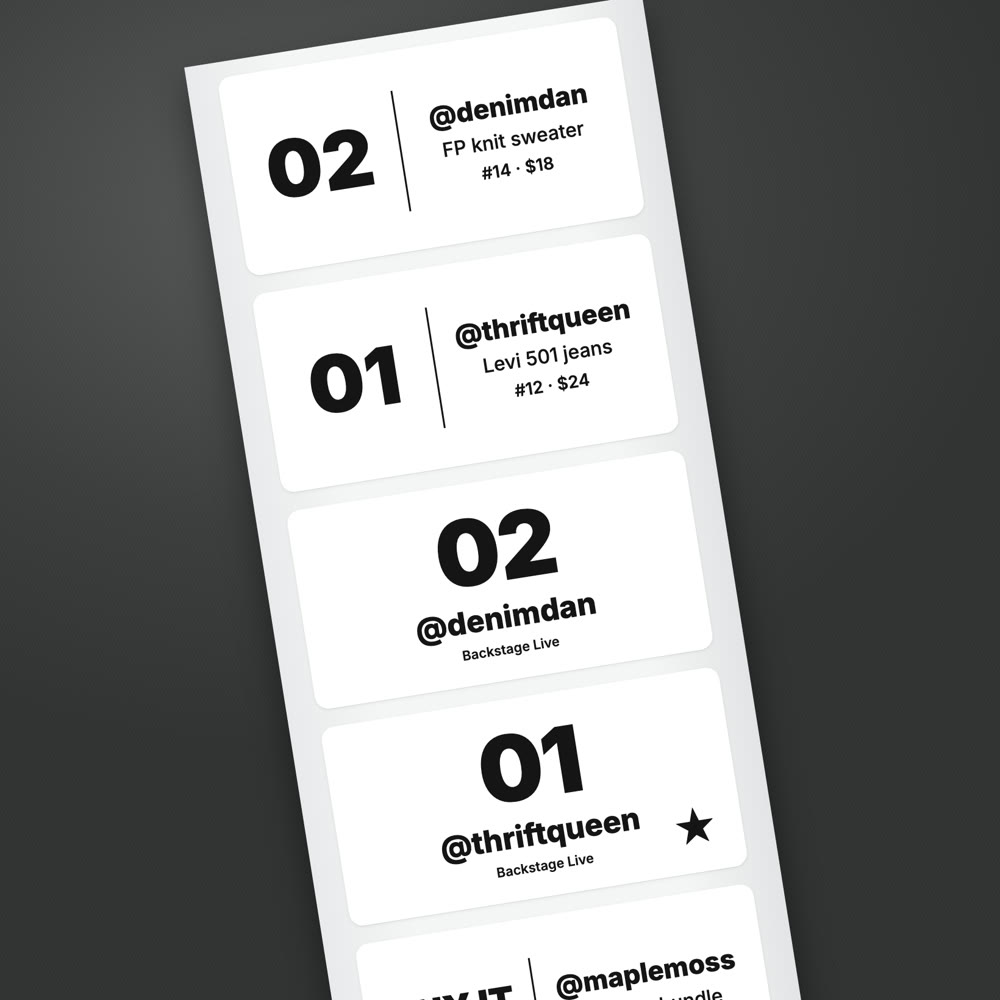
What comes out of the printer
- A bin label the second an item sells. Each buyer gets a bin number on their first win and keeps it for the whole show.
- A star for first-time buyers. So you can welcome them on air while they are still in the chat.
- A giveaway label. Giveaway winners get tagged like everything else.
- A pending label. When a sale is waiting on payment, so it does not get packed early.
- Item labels, if you want them. Add the item title and lot number, for sellers who tag every item.
A bin number and a username are all a packer needs. Sizes from 2 by 1 up to 4 by 6 inches, and your shop name can print on the label.
Works with the printer you have
iPad or iPhone
The native Backstage app prints on the iPad itself, with no computer in the setup. Your phone stays the camera.
- Bluetooth: Jadens JD-268BT, Nelko PL70E, Rongta RP425
- Wi-Fi: Brother QL (like the QL-820NWB), Rollo and other AirPrint label printers
If the printer drops mid-show, the app keeps reconnecting, and labels that didn't print wait and print when it's back.
Mac or Windows
Backstage Live runs in Chrome beside your show and prints through a small helper app to the label printer already installed on your computer.
- Rollo, Munbyn, Rongta and other installed label printers
Same plan and login as the iPad. Run Tuesday's show from the iPad and Thursday's from the laptop.
Printer not listed? Tell us and we'll test it.
More than a label
The label is the start. Backstage keeps the rest of the show sorted too.
A numbered bin per buyer
Kept for the whole show, so each bin is one order.
A packing list sorted by bin
Ready when you end the show, in the same order as your table.
What each item earned
After Whatnot's fees, as each item sells, not just the hammer price.
The moments you miss on camera
Giveaway winners, raids to thank and first-time buyers, as they happen.
One plan for iPad and computer
$24/month founding price, join by December 1 · regular $29
The Plus plan covers label printing on iPad, iPhone, Mac and Windows on one login, plus Prep for listing your show ahead of time. Keep the founding price for as long as you stay subscribed. Selling for other people? Pro adds consignment.
No label printer yet? Lite sorts every buyer into a bin and prints numbered bin-label sheets on any printer, so you can label by hand while you decide.
Questions before you print
What is a Whatnot label printer app?
It is an app that prints a small label by itself the moment an item sells during your Whatnot live show, so you stick it on the item instead of hand-writing a name. Backstage prints a bin label with the buyer's bin number and @username, from a native iPad or iPhone app or from Chrome on a Mac or Windows computer.
Does this print shipping labels?
No. These are bin labels, also called sorting labels, and they print live as items sell. Whatnot makes the shipping labels from the Shipments page in Seller Hub, and you print those when you pack. Backstage's packing list is already sorted by bin, so packing goes quickly.
Do I need a computer running during my show?
Not on iPad or iPhone. The Backstage app prints straight to a Bluetooth thermal label printer, or over Wi-Fi to a Brother QL or a Rollo or other AirPrint label printer, with no laptop anywhere. If you prefer a computer, Backstage Live prints from Chrome on Mac or Windows through a small helper app. Both are on the same plan.
Which label printers work?
On Mac and Windows, any label printer installed on that computer, including Rollo, Munbyn and Rongta. On iPad and iPhone, Bluetooth thermal printers such as the Jadens JD-268BT, Nelko PL70E and Rongta RP425, plus Brother QL printers like the QL-820NWB and Rollo or other AirPrint label printers over Wi-Fi. If yours isn't listed, tell us and we will test it.
What label sizes can I use?
2 by 1, 3 by 2 and 4 by 6 inches, plus 2 by 2, 3 by 3, 4 by 2, 4 by 3 and 4 by 4. Your own shop name can print on the bin label instead of ours.
How is this different from Whatnot's Sorting Labels?
Whatnot's Sorting Labels are free and print the listing title and buyer's username, but they need a computer running Whatnot Tray with your show open on whatnot.com for the whole show. Backstage adds a bin number per buyer that lasts the show, prints from an iPad or iPhone with no computer, and gives you a packing list sorted by bin and what each item earned after fees.
How much does it cost?
Label printing is in the Plus plan: $24 a month at founding pricing if you join by December 1, 2026, and you keep that price while you stay subscribed. The regular price is $29 a month. Plus covers the iPad and iPhone app and printing from Chrome on Mac and Windows on one login, plus Prep for listing your show ahead of time. Every plan starts with a 7-day free trial.
Is Backstage made by Whatnot?
No. Backstage is built by a working Whatnot seller and is not affiliated with Whatnot. It reads your own show while you're signed in, never asks for your Whatnot password, and never bids, buys or cancels anything for you.
Comparing label printer apps? Read how to choose a Whatnot label printer app, with setup steps and how Whatnot's own Sorting Labels compare.
Stop writing names. Keep selling.
Connect your printer, go live, and the first sale prints the first label.