
The payout report, item by item
What each item sold for, what Whatnot paid, the split, and who gets what.
Chrome + iPad
In the Backstage panel, tap My consignors, then Payout report (PDF). It opens a sheet you can print or save as a PDF, grouped by consignor and show.
Every item has its own line:
- Sold for: the sale price.
- Whatnot paid: what Whatnot paid you for it after its fees, using Whatnot's own numbers. Until Whatnot confirms the sale it's an estimate, marked est.
- Split: the consignor's % for this item. Tap ✎ to change it.
- Consignor gets (iPad: Their cut): their share.
- You keep: what Whatnot paid, minus the consignor's share.
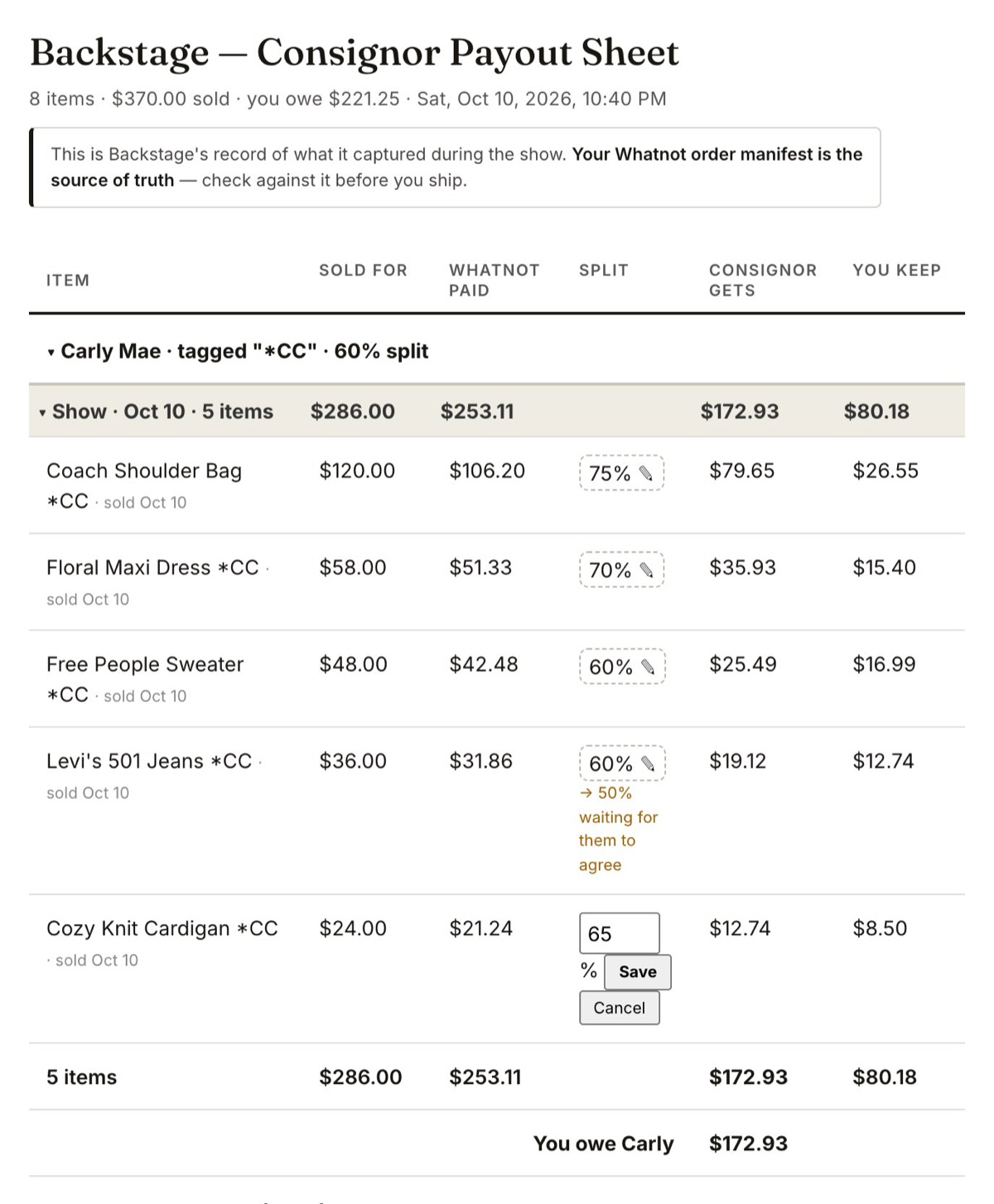
Send the PDF with your payout so your consignor sees exactly how it adds up. They can see the same items in their own portal.
On iPad
Open the consignor and tap See items under Recent shows to see the same lines on screen. The Payout ledger PDF has the same item-by-item columns.