Surprise Sets and card breaks
Item labels that wait for the real item or team before they print.
Chrome + iPad
Both are off until you turn them on, in the Surprise sets & breaks settings. Show Setup asks about them too.
- Chrome: menu ☰ › In show › Surprise sets & breaks.
- iPad: Settings › In show › Surprise sets & breaks.
Surprise Sets
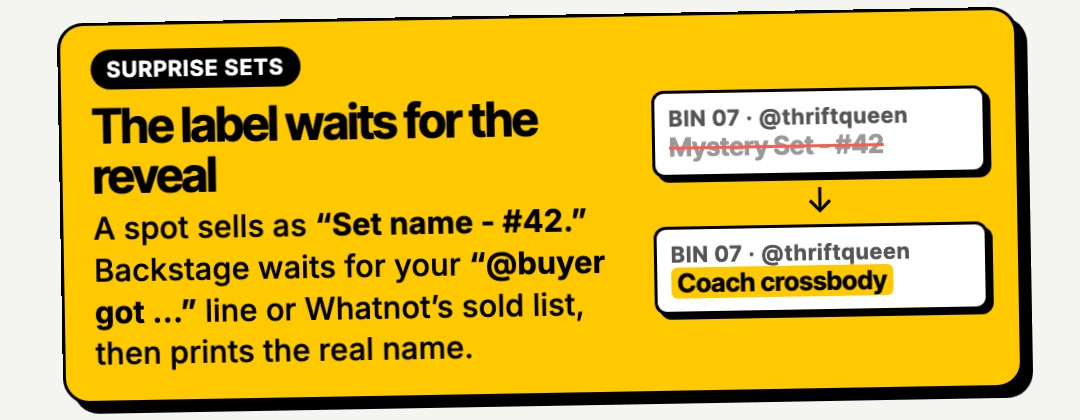
For Whatnot Surprise Sets, where each spot sells as "Set name - #42" and nobody knows the item until after the sale.
- The bin label prints at the sale, as usual.
- The item label waits for the real name. Backstage takes it from your "@buyer got …" line in chat, or from Whatnot's sold list. Then the label prints with it, and the sale is renamed everywhere.
- No name within 90 seconds? The label prints with the number, so nothing is held up.
Card breaks
For random team or color breaks. Turn on Card breaks: print item labels when the break opens.
- Each spot is named with its team or color from Whatnot's own record of the sale. A PASS respin updates it.
- The bin label prints at the sale, as usual.
- The item labels wait until you start the break (Whatnot's "Breaking Now"), then print together, each with the buyer's final team.
- A canceled break prints nothing. On the iPad, if a break still hasn't opened after a few hours, or when you end your show, Backstage asks whether to print its labels now or keep waiting.
Related
More in Show tools
- Buyer's choice: sizes and options from chat
- Buyer comments: what the winner typed in chat
- Sale photos
- Live link for your packer
- Box capacity and weekly bundled shipping
- Tag every buyer for a Buyer's Giveaway
- Giveaway plan
- Riding a raid train
- Change the look and the popups
- Tonight's goal, Show Wrapped and your share picture